Looking for NetMirror APK for Android TV? This guide explains what to check before installing NetMirror on an Android TV device, how APK compatibility works, and how to troubleshoot common installation and playback problems.
Android TV devices are different from regular Android phones and tablets. Although both can use Android-based applications, an APK designed for a phone does not automatically provide the same experience on a television. Before installing NetMirror, check the specific APK requirements and make sure your TV or TV box is compatible.
What Is NetMirror APK for Android TV?
NetMirror APK for Android TV refers to an Android application package that may be used on a compatible Android TV device.
Users searching for terms such as NetMirror Android TV APK, NetMirror APK for TV, NetMirror for TV Android, and NetMirror TV app are generally looking for a way to use the application on a television or TV box.
Compatibility depends on the specific release and device. An APK that works on an Android phone may not have the same interface, controls, or compatibility on Android TV.
NetMirror Android TV Compatibility
Before downloading or installing an APK on your television, check the device requirements.
Check Your Android TV Version
Open your TV’s settings and find the Android TV or operating system information. Compare it with the requirements of the NetMirror APK release you intend to use.
A newer APK may require a newer operating system, while older Android TV devices may have compatibility limitations.
Check Available Storage
Make sure your Android TV or TV box has enough free storage for the APK and application installation.
Insufficient storage can cause installation failures or affect application performance.
Check Device Type
Android TV can be found on televisions, streaming devices, and TV boxes from different manufacturers.
The interface and available settings can vary between devices, so the installation process may not be exactly the same everywhere.
NetMirror APK for Android TV Download
If you are searching for NetMirror APK for Android TV download, first identify a release that is compatible with your device.
Before downloading, review:
- APK version
- Android TV requirements
- File size
- Release information
- Device compatibility
- Download source
- Installation requirements
Do not assume that a page claiming to offer the “latest TV APK” is automatically compatible with your television.
Choosing the Right TV APK
A suitable APK should match the operating system and hardware of your Android TV device.
If a release is intended only for a phone interface, it may not be optimized for television navigation. When available, a TV-compatible release is preferable for a TV-focused setup.
How to Install NetMirror APK on Android TV
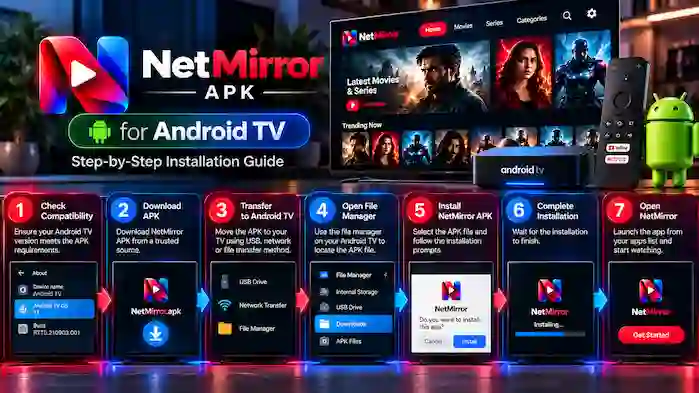
The exact installation method depends on the Android TV device and how the APK is transferred to it.
Step 1: Check Compatibility
Before transferring the APK to your TV, confirm that the version supports your Android TV device.
Step 2: Obtain the APK
Download the appropriate NetMirror APK from a source you trust.
You can first download it to a compatible device and then use an appropriate method to transfer it to the Android TV device.
Step 3: Transfer the APK
Depending on your setup, the APK may be transferred to the TV or TV box using an available file-transfer or storage method.
Make sure the file is complete before attempting installation.
Step 4: Open the File
Use the file manager available on your Android TV device to locate the APK.
Select the file to begin the installation process.
Step 5: Review Android’s Security Prompt
Android may display a warning when installing an application from outside the standard app-store process.
Read the warning carefully and only continue when you understand the source of the file.
Step 6: Complete Installation
Follow the prompts displayed by Android TV to complete the installation.
Step 7: Open NetMirror
Once installation finishes, open NetMirror from your application list.
If the application does not appear correctly, check compatibility and whether the APK was designed for Android TV.
NetMirror TV App
The phrase NetMirror TV app can refer to users looking for a television-friendly version of the application.
A TV interface needs to work well with remote controls rather than relying entirely on touch input.
When evaluating an APK for TV, consider:
- Remote navigation
- Screen layout
- Text readability
- Menu navigation
- Application compatibility
- Playback controls
A phone-focused application may technically install but still provide a poor TV experience if it is not designed for remote navigation.
NetMirror TV APK Latest Version
Users often search for NetMirror TV APK latest version when they want an updated release.
Before updating an existing installation, check the new version’s requirements and compatibility with your Android TV device.
Compare:
- Current version
- New version
- Android requirement
- File size
- Release information
- Compatibility
Do not update solely because a download page labels a file as the latest version. Verify the actual version information first.
NetMirror APK for Android TV Features
Features can vary depending on the version and device. The following areas are commonly important when using an entertainment application on a television.
TV-Friendly Navigation
A TV application should be easy to navigate using a remote control or compatible input device.
Content Search
If search is available, it can make finding a specific movie or series easier than manually browsing multiple categories.
Content Categories
Categories can help organize available content and make browsing more convenient.
Video Playback
Playback functionality can vary between versions and devices. Performance may also depend on your internet connection and TV hardware.
Subtitle Options
Where supported, subtitles can be adjusted according to the available content and application controls.
Quality Options
If multiple playback quality settings are available, the appropriate option may depend on your internet connection and TV resolution.
Simple Interface
A clear interface is particularly useful on a large screen because menus need to remain readable from a distance.
NetMirror APK for TV Box
Some users search for NetMirror APK for TV box because Android-based TV boxes can provide an Android application environment on a television.
Compatibility still needs to be checked separately for each device.
Before installation, check:
- Android version
- Available storage
- Hardware compatibility
- APK requirements
- Input method
- File integrity
A TV box running Android does not guarantee compatibility with every Android APK.
Using NetMirror With an Android TV Remote
A remote control can change how an application is used compared with a touchscreen phone.
When opening NetMirror on Android TV, navigation may involve:
- Direction buttons
- Select or OK button
- Back button
- Home button
- On-screen keyboard
If an application is not designed for TV navigation, some controls may be difficult to access.
NetMirror Android TV Installation Problems
If the APK does not install, start by checking the basic compatibility requirements.
APK Will Not Install
Possible causes include:
- Unsupported Android TV version
- Insufficient storage
- Damaged APK
- Installation restrictions
- Incompatible APK architecture
- Existing application conflicts
App Installs but Does Not Open
An application can sometimes install successfully but fail when launched.
Check whether the release is actually compatible with your Android TV device. A phone-oriented APK may not work correctly on a TV environment.
App Is Difficult to Navigate
If buttons or menus do not respond correctly to the remote, the application may not be optimized for TV navigation.
NetMirror Keeps Crashing
Crashes can result from compatibility problems, application bugs, insufficient resources, or device-specific issues.
Video Playback Problems
If content does not play correctly, check your internet connection, application version, and device compatibility.
Buffering on Android TV
Streaming performance depends on the network connection, device performance, application, and available playback settings.
If quality controls are available, selecting an appropriate quality for your connection may help.
NetMirror Android TV Safety Tips
Manual APK installation requires additional care.
Use a Trusted Source
Before downloading an APK, consider the source and available file information.
Verify the APK
Check the file name, version, size, and requirements before installation.
Review Permissions
After installation, review the permissions requested by the application.
Keep Android TV Updated
Keep your Android TV device and its security features up to date where possible.
Avoid Suspicious Modified APKs
Be cautious with files described as cracked, modified, or unlocked. You should know what software you are installing and where it came from.
NetMirror Android TV vs Smart TV
Not every Smart TV uses Android TV.
This distinction is important because an Android APK is designed for an Android environment. A television running another operating system may not support APK installation in the same way.
Before downloading NetMirror APK, identify the operating system of your TV.
Android TV
Can support compatible Android applications and APK installation methods.
Other Smart TV Platforms
Different Smart TV operating systems use different application formats and installation methods.
If your television does not run Android TV or a compatible Android environment, do not assume that an Android APK can be installed directly.
Can NetMirror APK Be Used on Fire TV?
Fire TV devices use an Android-based software environment, but compatibility with individual APKs can vary.
Before attempting installation, check the application’s requirements and the specific Fire TV device.
Do not assume that an APK compatible with an Android phone will automatically provide the same experience on Fire TV.
NetMirror Android TV Updates
When a new NetMirror release becomes available, check whether it changes Android requirements or TV compatibility before updating.
A good update checklist includes:
- Check the new version.
- Review Android requirements.
- Confirm TV compatibility.
- Check available storage.
- Verify the APK source.
- Consider existing application data.
- Install only when the release is suitable.
NetMirror Android TV vs Android Phone
Although both environments use Android, their user experiences are different.
| Feature | Android Phone | Android TV |
| Main input | Touchscreen | Remote/controller |
| Display | Small screen | Large screen |
| Navigation | Touch gestures | Directional navigation |
| Interface | Mobile-oriented | TV-oriented |
| APK compatibility | Device dependent | Device dependent |
| Installation | Phone file manager | TV/file-transfer method |
This is why users should check for TV compatibility rather than assuming every Android APK is suitable for television.
Frequently Asked Questions
What is NetMirror APK for Android TV?
It refers to a NetMirror Android application package intended for use on a compatible Android TV environment.
Can I install NetMirror APK on Android TV?
You may be able to install it if the specific APK and your Android TV device are compatible.
How do I download NetMirror APK for Android TV?
Check the available APK version, verify Android TV compatibility, and download the appropriate file from a source you trust.
Does NetMirror APK work on every Android TV?
No application should be assumed to work on every Android TV device. Compatibility depends on the Android version, hardware, APK requirements, and application design.
Can I use a phone APK on Android TV?
A phone APK may sometimes install in an Android TV environment, but installation does not guarantee proper TV navigation or compatibility.
Why is NetMirror APK not installing on Android TV?
Possible causes include insufficient storage, an incompatible Android version, an unsuitable APK architecture, a damaged file, or installation restrictions.
Why does NetMirror not work correctly with my TV remote?
The application may not be optimized for Android TV or remote navigation. A phone-oriented interface can have controls that are difficult to operate with a TV remote.
Can I use NetMirror on a Smart TV?
Only if the Smart TV uses a compatible Android environment or another supported access method is available. Other Smart TV operating systems may use different application formats.
Can I use NetMirror APK on Fire TV?
Compatibility can vary by Fire TV model and APK release. Check the requirements before installation.
How do I update NetMirror on Android TV?
Check the new APK version and requirements, confirm compatibility, and install the newer release using an appropriate Android TV installation method.
Final Thoughts
NetMirror APK for Android TV is a device-specific search intent that should not be treated exactly the same as NetMirror for Android phones.
Before installing the application on a television, check the Android TV version, available storage, APK requirements, and device compatibility. Also consider whether the application is designed for remote-based navigation.
If installation fails, investigate compatibility, storage, APK integrity, and installation settings rather than repeatedly trying unrelated versions.
For Android TV users, choosing a compatible release is more important than simply selecting the newest APK. Check the available version information first, then follow the appropriate installation process for your particular TV or TV box.