

Looking for NetMirror for iOS on an iPhone or iPad? This guide explains what iOS users should know about NetMirror, the difference between Android APK files and iOS applications, browser-based access, compatibility considerations, and common problems.
One important point should be clear from the beginning: an APK is an Android application package. iPhone and iPad do not normally install Android APK files as native iOS applications. Therefore, if you are searching for NetMirror APK for iPhone or NetMirror APK iOS, you should first determine whether a compatible iOS application or web version is available.
What Is NetMirror for iOS?
NetMirror for iOS refers to accessing NetMirror-related services from an iPhone or iPad.
Users may search for:
- NetMirror for iPhone
- NetMirror for iOS
- NetMirror iOS
- NetMirror iOS app
- NetMirror iOS APK
- NetMirror APK for iPhone
- NetMirror download iOS
- NetMirror webview iOS
These keywords do not all represent the same type of access.
An Android APK is different from an iOS application, so an APK downloaded from an Android-focused website should not be expected to install directly on an iPhone.
Can You Install NetMirror APK on iPhone?
No. An Android APK is not the standard application format used by iPhone or iPad.
Android applications are distributed using APK packages, while iOS applications are distributed through Apple’s application ecosystem.
Therefore, downloading a file named something like NetMirror.apk to an iPhone does not make it an iOS application.
If you are an iPhone user, look for one of these options instead:
- A compatible iOS application
- A supported web version
- Another legitimate access method designed for iPhone or iPad
NetMirror for iPhone
Users searching for NetMirror for iPhone generally want to know whether they can access the service from an iPhone.
The answer depends on whether a compatible iOS application or web interface is available.
Before installing or opening anything, check:
- Whether the application is actually designed for iOS
- Whether it is available through an appropriate Apple-supported source
- Whether the version supports your iOS release
- Whether the website is compatible with mobile Safari or another supported browser
Do not install an unknown configuration profile or application simply because a website labels it as a “NetMirror iOS version.”
NetMirror iOS App
An iOS application is different from an Android APK.
If an official or legitimate iOS version exists, it should be distributed through an appropriate iOS-compatible channel rather than presented as an Android APK.
When looking for the NetMirror iOS app, verify the application name, developer information, compatibility, and source before installing it.
Be particularly careful with websites offering unusual installation methods or asking you to provide unnecessary account information.
NetMirror iOS APK
The phrase NetMirror iOS APK is technically misleading because APK is an Android package format.
An APK can be associated with Android devices, but it is not the normal installation format for iPhone or iPad.
If you find a website claiming that you can install an Android APK directly on an iPhone, treat the claim cautiously and verify what file or installation method is actually being offered.
NetMirror Download for iOS
If you are searching for NetMirror download iOS, the first step is to determine what type of download you actually need.
iPhone or iPad Application
If a compatible iOS application is available, use the appropriate Apple-supported distribution method.
Web Access
If a compatible NetMirror web version exists, you may be able to access it through Safari or another supported browser without installing an application.
Android APK
An Android APK is not an appropriate native installation file for an iPhone.
NetMirror Web on iPhone
A browser-based option can be useful for iPhone users when a compatible web version is available.
Instead of installing an APK, you can open the supported website through Safari or another compatible browser.
Advantages of Web Access
- No Android APK required
- No manual APK installation
- Works through a browser
- Easier to remove because there is no APK package to uninstall
However, web functionality depends entirely on the service and its compatibility with mobile browsers.
How to Access NetMirror on iPhone Through the Web
If a compatible web version is available, the basic process is simple.
Step 1: Open Safari
Launch Safari on your iPhone or iPad.
Step 2: Open the Supported Web Address
Enter the legitimate NetMirror web address into the browser.
Avoid using unfamiliar links that redirect through multiple pages.
Step 3: Check the Page
Make sure the website loads correctly and that its interface is suitable for your device.
Step 4: Sign In if Required
If the legitimate service provides an account system, use its normal login page.
Never enter your password into an unfamiliar page simply because it uses the NetMirror name.
Step 5: Use the Available Features
If the web version is compatible with iOS, use the available search, navigation, and playback features through the browser.
NetMirror WebView iOS
The keyword NetMirror webview iOS can create confusion because WebView technology is commonly associated with displaying web content inside applications.
An iOS application can use Apple’s web technologies to display web content, but that does not mean an Android WebView APK can be installed on an iPhone.
If your goal is simply to access a website, use a supported iOS browser rather than trying to install an Android WebView package.
NetMirror iOS Compatibility
Compatibility depends on how NetMirror is being accessed.
Browser Compatibility
For web access, compatibility depends on the website, Safari or another browser, and the iOS version.
Application Compatibility
If an iOS application exists, check its stated iOS requirements before installation.
Android APK Compatibility
Android APK files are not native iOS applications and should not be treated as compatible with iPhone or iPad.
NetMirror for iPad
iPad users face the same APK limitation as iPhone users.
An Android APK cannot simply be installed as a native iPad application.
If a compatible iOS or iPadOS application is available, check its requirements. Otherwise, a supported web interface may be the more appropriate option.
The larger iPad display can also provide a different browsing experience compared with an iPhone.
NetMirror iOS Features
Available features depend on the access method and the specific version.
If a supported web or iOS application is available, users may look for features such as:
Search
Search can help users locate specific content when supported by the service.
Categories
Content categories can make browsing easier than manually searching through every available title.
Playback Controls
A compatible browser or iOS application may provide standard playback controls.
Subtitle Support
If subtitles are supported, available options can depend on the content and version.
Mobile-Friendly Interface
A properly designed iOS web interface should adapt to the smaller iPhone display and touch controls.
NetMirror iOS vs Android APK
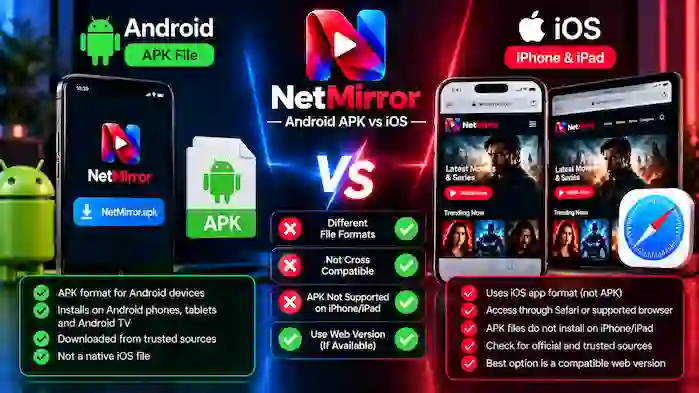
The difference between iOS access and Android APK installation is important.
| Feature | Android | iPhone/iPad |
| Application format | APK | iOS-compatible application |
| Standard installation | Android environment | Apple application ecosystem |
| APK support | Yes | No |
| Browser access | Possible | Possible when supported |
| Main input | Touchscreen | Touchscreen |
| Compatibility | Android version/device | iOS/iPadOS version/device |
The same application name does not mean that the same installation file works on both platforms.
NetMirror iOS Safety Tips
iPhone users should be cautious when searching for unofficial applications or downloads.
Avoid Unknown Profiles
Do not install configuration profiles simply because a website claims they are required for NetMirror.
Verify the Application Source
Check the source, application identity, developer information, and compatibility before installing software.
Be Careful With Login Pages
Avoid entering Apple ID credentials or other sensitive information into unfamiliar websites.
Avoid Suspicious Download Prompts
A website asking you to install unrelated applications, browser extensions, or profiles should be treated carefully.
Keep iOS Updated
Keep your iPhone or iPad updated where possible and use Apple’s built-in security protections.
NetMirror iOS Common Problems
NetMirror APK Will Not Install on iPhone
This is expected because APK is an Android application format, not a native iOS application format.
NetMirror Website Will Not Open
Check your internet connection, browser version, and whether the website is currently available.
Web Page Looks Incorrect
Try refreshing the page or using a current version of Safari. Website compatibility can vary between browsers and devices.
Video Will Not Play
Playback problems can be related to browser compatibility, network conditions, content availability, or the web service itself.
Login Is Not Working
Verify that you are using the correct and legitimate login page. Do not repeatedly enter credentials on unfamiliar pages.
Website Keeps Redirecting
Unexpected redirects can indicate a problem with the website or the page you are visiting. Avoid entering personal information on pages you do not trust.
NetMirror iOS vs Web Access
For iPhone users, the distinction between an application and web access is especially important.
iOS Application
An iOS application is designed specifically for Apple’s operating system and installed through an appropriate iOS-compatible distribution method.
Web Version
A web version runs through a browser and does not require installation of an Android APK.
If no compatible iOS application is available, a legitimate web version may be the simpler alternative when supported.
NetMirror for iPhone Download Alternatives
If you cannot find a legitimate iOS version, do not download an Android APK and expect it to work on an iPhone.
Instead, consider:
- Checking whether a compatible iOS application is available.
- Checking whether a legitimate web version exists.
- Using another supported service that works on iPhone.
- Avoiding unofficial configuration profiles or suspicious installers.
The correct option depends on what access methods the service currently supports.
Frequently Asked Questions
Is NetMirror available for iOS?
Availability can depend on the current version and distribution method. Check for a legitimate iOS application or supported web version rather than assuming an Android APK will work.
Can I install NetMirror APK on iPhone?
No. APK is an Android application package and is not the standard installation format for iPhone or iPad.
What is NetMirror iOS APK?
The phrase is technically inaccurate because APK is an Android package format. iOS applications use a different application ecosystem.
Can I use NetMirror on iPhone?
That depends on whether a compatible iOS application or web version is available.
Can I use NetMirror on iPad?
If a compatible iOS/iPadOS application or web version is available, iPad users may be able to access it. Android APK files are not native iPad applications.
Can I download NetMirror on iPhone?
Only use an iPhone-compatible application or supported web access method. Do not treat an Android APK as an iOS download.
Can I use NetMirror through Safari?
If a compatible web version exists, Safari may be able to access it. Website compatibility depends on the service.
Why does a NetMirror APK not work on iPhone?
Because APK files are designed for Android rather than iOS.
Is NetMirror WebView available on iOS?
WebView technology exists on iOS, but an Android WebView APK cannot simply be installed on an iPhone. Use a compatible iOS application or web version instead.
Final Thoughts
NetMirror for iOS requires a different approach from NetMirror on Android. The most important point is that an Android APK cannot be installed as a normal iPhone or iPad application.
If you are an iOS user, first check whether a compatible iOS application is available. If not, determine whether a legitimate web version can provide the access you need.
Avoid websites that claim an Android APK can be installed directly on an iPhone, and be especially cautious with unknown profiles, suspicious installers, and pages requesting sensitive account information.
For iPhone and iPad users, the safest approach is to use an access method specifically designed for iOS or a supported browser-based version rather than attempting to force an Android APK onto an Apple device.