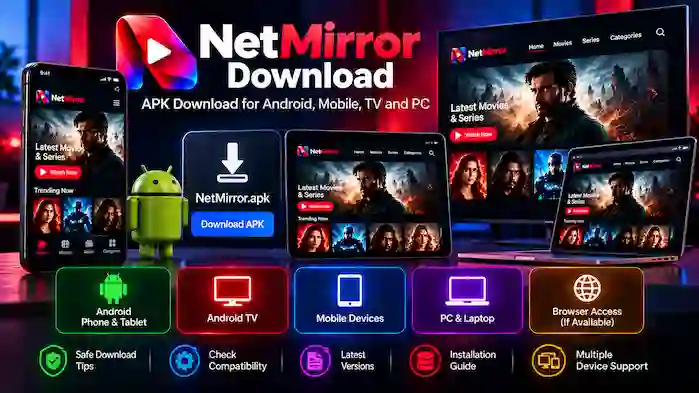
Looking for NetMirror download options? This guide explains how to approach NetMirror APK downloads, how to choose a compatible version, what to check before downloading, and how to prepare your Android phone, tablet, or Android TV device for installation.
NetMirror download searches can refer to several different things. Some users want the Android APK, while others are searching for a mobile version, TV version, PC access, or a browser-based option. Choosing the correct version is important because an APK designed for one device may not work correctly on another.
What Is NetMirror Download?
NetMirror download generally refers to obtaining the NetMirror application or a compatible access method for your device.
Common searches include:
- NetMirror download
- NetMirror APK download
- NetMirror download APK
- NetMirror app download
- NetMirror download app
- NetMirror download for Android
- NetMirror download APK for mobile
- NetMirror TV app download
- NetMirror APK download for Android TV
- NetMirror download for laptop
The first step is identifying which device you are using.
NetMirror APK Download
If you are looking for NetMirror APK download, remember that an APK is an Android application package.
An APK is intended for compatible Android devices and is not the same as a Windows executable or an iOS application.
Before downloading, check:
- Android version
- Device compatibility
- APK version
- File size
- Available storage
- Source of the file
- Installation requirements
Avoid downloading a file simply because a page labels it as the “latest APK.” Check the actual version and compatibility information first.
NetMirror Download for Android
Android phones and tablets are the primary devices associated with APK installation.
Before starting a NetMirror download for Android, confirm that your device supports the Android version required by the APK.
Check Android Version
Open your device settings and locate the Android version information.
Compare your Android version with the requirements listed for the APK you plan to install.
Check Storage
Make sure enough free storage is available.
A lack of storage can prevent an APK from installing successfully.
Check the APK Source
Use a source you trust and examine the download information before opening the file.
NetMirror APK Download for Android Phone
Users searching for NetMirror APK download for Android phone are usually looking for a mobile-compatible APK.
A phone version should be evaluated based on the device’s Android version, architecture, storage, and other requirements.
Before downloading, check whether the APK is intended for:
- Android phones
- Android tablets
- Android TV
- A particular Android version
Do not assume that an APK optimized for Android TV will provide the same experience on a smartphone.
NetMirror Download APK for Mobile
The search term NetMirror download APK for mobile has a similar intent.
For a mobile device, check whether the interface is designed for touchscreen navigation and whether the APK supports your Android version.
A file may install successfully while still providing a poor user experience if it was designed for another type of device.
NetMirror App Download
NetMirror app download can refer to either an APK download or another supported application distribution method.
If an official application distribution method is available for your device, it should generally be preferred over an unknown APK source.
If you are downloading an APK manually, verify the source and file information before installation.
NetMirror Download App
The phrase NetMirror download app is often used by people searching for the application rather than information about the website.
Before installing an application, verify:
- Application name
- Version
- Developer or publisher information
- Required permissions
- Supported operating system
- Source of the download
Be cautious with applications that request permissions unrelated to their stated purpose.
NetMirror Latest Version Download
Users often search for NetMirror latest version because they want the newest available release.
However, the newest file is not automatically the best choice for every device.
Before updating, check:
- Version number
- Release information
- Android requirement
- Device compatibility
- File size
- Available storage
- Changes from the previous version
If an older version is the only version compatible with your device, installing a newer release may not solve the problem.
NetMirror APK Latest Version 2026
Searches such as NetMirror APK latest version 2026 indicate users looking for a current release.
Because APK versions can change over time, verify the actual version number rather than relying only on a year in the page title.
A trustworthy download page should provide useful version information instead of simply labeling every file as “latest.”
How to Download NetMirror APK
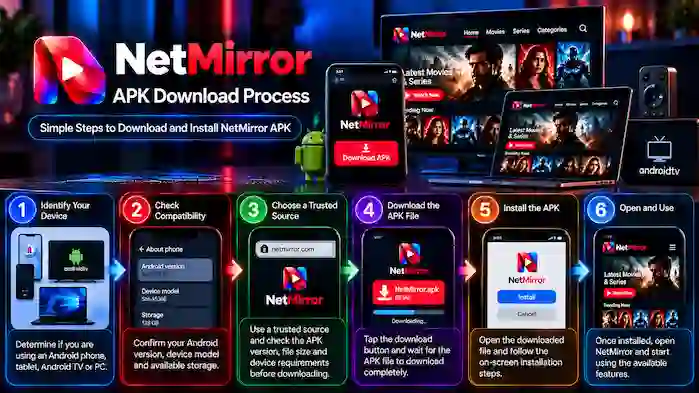
The general process is straightforward.
Step 1: Identify Your Device
Determine whether you are using an Android phone, tablet, Android TV, or another device.
Step 2: Check Compatibility
Review the Android version and other requirements for the APK.
Step 3: Choose the Appropriate Version
Select a release that matches your device rather than automatically selecting the newest file.
Step 4: Download the APK
Download the file from a source you trust.
Step 5: Check the Download
Before opening the APK, check its file name, size, and version information.
Step 6: Prepare for Installation
If your Android device restricts installations from outside its normal application source, review the relevant security settings carefully.
Step 7: Install the APK
Open the downloaded APK and follow Android’s installation prompts.
Step 8: Launch the Application
After installation, open NetMirror and check whether it works correctly on your device.
NetMirror APK Install
Downloading and installing are two separate steps.
A successful download only means that the APK file has been saved to your device. The file still needs to be compatible and properly installed.
For detailed instructions, see our NetMirror APK Install guide.
NetMirror Install APK Android
When installing NetMirror on Android, compatibility is the most important consideration.
If installation fails, check:
- Android version
- Free storage
- APK integrity
- Existing application version
- Installation permissions
- Device architecture
Avoid repeatedly installing random APK versions without identifying the actual cause of the problem.
NetMirror APK Download for Android TV
Android TV requires additional compatibility checks.
An APK designed for a phone may not have a TV-friendly interface, even if it installs successfully.
Before downloading NetMirror APK for Android TV, check:
- Android TV version
- APK requirements
- TV compatibility
- Remote-control navigation
- Storage availability
- Screen interface
For a detailed TV guide, see our NetMirror APK for Android TV pillar page.
NetMirror TV App Download
Users searching for NetMirror TV app download may be looking for an Android TV or TV-box version.
Make sure the file is actually intended for your TV environment.
A TV-focused version should ideally support remote navigation and provide an interface that works well on a large display.
NetMirror APK for TV
The phrase NetMirror APK for TV does not necessarily mean that every Smart TV can install the APK.
Different Smart TVs use different operating systems.
Before downloading, identify whether your television uses:
- Android TV
- Google TV
- Another Android-based environment
- A different Smart TV operating system
An Android APK is not universally compatible with every Smart TV.
NetMirror Download for PC
PC users may search for NetMirror download because they want to install the Android application on Windows.
Remember that an APK is an Android package, not a standard Windows installer.
If you want to use NetMirror on a computer, check whether a compatible web version or supported desktop access method exists.
For more information, see our NetMirror for PC guide.
NetMirror Download for iPhone
An Android APK should not be downloaded with the expectation that it will install on an iPhone.
iOS uses a different application ecosystem.
If you use an iPhone or iPad, check whether a compatible iOS application or supported web version exists.
See our NetMirror for iOS guide for more information.
NetMirror Web Download Alternative
If you do not want to install an APK, a compatible web version may provide another way to access the service.
Browser-based access can be useful on:
- Android
- iPhone
- iPad
- Windows
- Mac
The availability of web functionality depends on the service and its current website.
For browser-related information, see our NetMirror Web guide.
How to Choose the Right NetMirror APK
Choosing an APK should involve more than looking at the file name.
Check the Version
Confirm the exact version number.
Check Android Requirements
Make sure your Android version meets the application’s requirements.
Check Device Type
A phone, tablet, and Android TV can have different requirements.
Check File Information
Review file size and other available details.
Check the Source
Use a download source you trust.
Check Update Information
If you are replacing an existing version, review what has changed before updating.
NetMirror Download Safety Tips
Manual APK downloads require extra caution.
Download From a Trusted Source
Avoid random file-sharing pages or suspicious mirrors.
Verify the File
Check the file name, version, and size before opening it.
Review Permissions
Pay attention to permissions requested during installation.
Avoid Modified Files
Be cautious with APKs described as cracked, modified, unlocked, or premium.
Keep Android Protected
Keep your device’s security features active and review Android warnings before installing an unfamiliar application.
Do Not Disable Security Without Understanding Why
Never turn off device protections simply because a website tells you that it is necessary for an APK download.
Common NetMirror Download Problems
Download Does Not Start
Check your internet connection and available storage.
If the website contains multiple download buttons, make sure you are selecting the intended file rather than an advertisement or unrelated link.
APK File Is Damaged
A failed or incomplete download can result in an APK that cannot be installed.
Download the file again from a trustworthy source and compare its file information.
APK Is Not Compatible
The APK may require a newer Android version or a different device architecture.
Check the requirements before trying another release.
Not Enough Storage
Free some device storage and try again.
Installation Is Blocked
Android may restrict installations from outside its normal application sources. Review the relevant security settings carefully and only proceed when you trust the file source.
App Crashes After Installation
A successful installation does not guarantee compatibility.
Check the APK version, Android version, and device requirements.
NetMirror Download vs NetMirror APK Download
These terms are closely related but can have slightly different search intent.
NetMirror download is a broad query that can refer to the application, website, or another access method.
NetMirror APK download specifically indicates an Android APK.
This distinction is useful when organizing content because users searching for the broader term may not necessarily want an APK.
NetMirror Download vs Web Access
| Feature | APK Download | Web Access |
| Installation | Required | Usually not required |
| Format | APK | Website |
| Primary environment | Android | Compatible browser |
| Manual updates | May be required | Usually server-side |
| Storage | Application storage | Minimal local installation |
| Device support | Android dependent | Browser dependent |
Choose the option that matches your device and intended use.
Frequently Asked Questions
What is NetMirror download?
NetMirror download generally refers to obtaining the application or accessing NetMirror through an available download or supported access method.
Where can I download NetMirror APK?
Use a source you trust and verify the APK version, compatibility, and file information before installing it.
Can I download NetMirror on Android?
If a compatible Android version is available, Android users may be able to download and install the APK.
Can I download NetMirror APK on iPhone?
Downloading an APK to an iPhone does not make it compatible with iOS. APK files are designed for Android.
Can I download NetMirror on PC?
You can download an APK file to a PC, but an APK is not a native Windows application. A compatible Android environment or web access may be required.
Can I download NetMirror for Android TV?
If a compatible Android TV release is available, check its requirements before installing it on your TV or TV box.
How do I know which NetMirror APK version to download?
Compare the APK’s Android requirements, device compatibility, version number, and file information with your device.
Should I always download the latest NetMirror APK?
Not necessarily. The newest version may require a newer Android version or may not be compatible with your particular device.
Why is NetMirror APK not installing?
Common causes include incompatible Android versions, insufficient storage, a damaged APK, unsupported architecture, or installation restrictions.
Is NetMirror download safe?
Safety depends on the source and the file. Verify where the APK comes from, review permissions, and avoid suspicious modified or unknown files.
Final Thoughts
NetMirror download covers several different user needs, from obtaining an Android APK to finding a mobile, TV, PC, or browser-based access method.
Before downloading anything, identify your device first. Android phone users should check Android compatibility, while Android TV users should look for TV-specific requirements. iPhone and iPad users should not attempt to install Android APK files, and PC users should remember that an APK is not a native Windows application.
Most importantly, verify the APK source, version, file information, and compatibility before opening the file. A careful download process can help prevent common installation and security problems.
For the best experience, use the version or access method specifically suited to your device rather than assuming that one NetMirror download works across every platform.