

Looking for NetMirror APK download for your Android phone or tablet? This guide explains how to download the NetMirror APK, check compatibility, choose the right version, and prepare your Android device for installation.
If you are searching for NetMirror download, NetMirror APK download for Android, or NetMirror app download, the most important thing is to make sure the APK matches your device and that you understand the installation requirements before opening the file.
NetMirror APK Download
NetMirror APK download refers to getting the Android package used to install the NetMirror application. APK files are designed for Android devices, so you should check your phone or tablet’s Android version before downloading a particular release.
Different APK releases may have different requirements. A version that works on one Android device may not necessarily work correctly on another. For this reason, check the available version information before starting the download.
What to Check Before Downloading
Before downloading NetMirror APK, review these details:
- APK version
- Android compatibility
- File size
- Release information
- Installation requirements
- Available permissions
- Download source
- Available update information
Checking these details first can help you avoid downloading an unsuitable or incomplete file.
NetMirror APK Download for Android
Android users commonly search for terms such as NetMirror APK download for Android, NetMirror app, and NetMirror APK download for Android phone.
These searches generally indicate that the user wants an Android-compatible APK. However, the correct version depends on the device and the release being offered.
If you are using an Android phone, check your Android version and available storage before downloading. Tablets can also have different compatibility requirements depending on their hardware and operating system.
NetMirror APK for Android Mobile
For mobile users, the download process normally starts with selecting a compatible APK file and saving it to the device.
Before installation, make sure the download has completed successfully. An incomplete or damaged APK may cause installation errors even when the device itself is compatible.
How to Download NetMirror APK
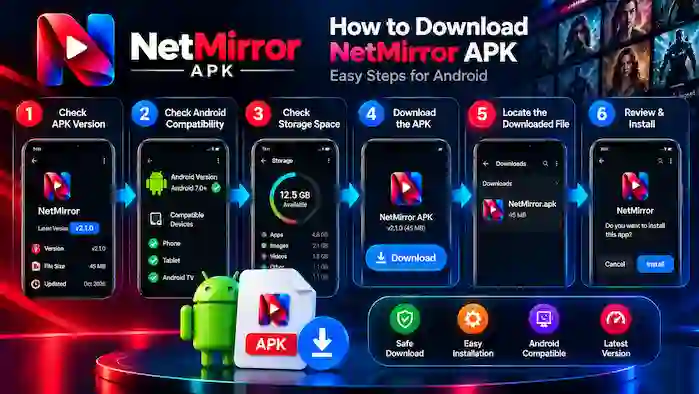
Downloading an APK is straightforward when the file is available from a source you trust.
Step 1: Check the APK Version
First, review the version number displayed on the download page. If you are looking for the latest release, make sure the version information is current.
Step 2: Check Android Compatibility
Review the Android requirements associated with the APK. Do not assume that every release supports every Android device.
Step 3: Check Available Storage
Make sure your device has enough free storage for both the downloaded APK and the installed application.
Step 4: Download the APK
Select the appropriate download option and wait until the file has completely downloaded.
Step 5: Locate the Downloaded File
After the download finishes, open your device’s Downloads folder or file manager and locate the APK file.
Step 6: Review the File
Before installing, check the file name and other available information. If the file appears different from what you expected, do not install it until you have verified the source.
For the complete installation process, visit our NetMirror APK Installation guide.
NetMirror APK Latest Version
Many users specifically search for NetMirror APK latest version because they want the newest available release.
A newer version may include changes to the interface, compatibility, performance, or other application functions. However, newer does not always mean that it is suitable for every device.
Before updating, compare the new release with your current version.
Check:
- Version number
- Android requirements
- File size
- Release information
- Compatibility
- Changes included in the update
If your current version works correctly, you should still verify compatibility before replacing it with a newer APK.
NetMirror APK Download for Android Phone
NetMirror APK downloads are commonly searched by Android phone users. The basic download process is similar across many Android devices, but individual manufacturers may use different settings and file managers.
Before downloading to your phone:
- Check the Android version.
- Make sure sufficient storage is available.
- Verify the APK version.
- Use a source you trust.
- Review the file before installation.
If installation fails after downloading, check our guide covering NetMirror APK installation problems.
NetMirror App Download
Some users search for NetMirror app download, NetMirror download app, or NetMirror app download APK.
These searches generally have the same goal: finding the Android application package. Rather than downloading multiple files from different pages, identify the version you need and check its compatibility before installation.
The APK format is primarily associated with Android. If you are using an iPhone or iPad, an Android APK is not the normal application format. See our dedicated NetMirror for iOS guide for platform-specific information.
NetMirror APK Download for Android TV
Android TV users may search for NetMirror APK for Android TV, NetMirror Android TV APK, or NetMirror TV app APK download.
TV compatibility should be checked separately from phone compatibility. An APK designed for Android phones may not provide the same interface or controls on a television.
If your goal is to install NetMirror on an Android TV device, check the requirements of the specific release before downloading it.
Our NetMirror for Android TV guide provides more information about TV compatibility and installation.
NetMirror APK for PC and Laptop
Another common search is NetMirror APK for PC or NetMirror for laptop.
An APK is an Android application package and should not automatically be described as a native Windows or macOS application. If you want to use NetMirror on a computer, first determine whether a web-based option or another compatible method is available.
You can learn more in our dedicated NetMirror for PC guide.
NetMirror APK Download Safety
Downloading an APK requires more attention than downloading an application through a standard app store.
Before installing a downloaded file, consider:
Check the Source
Use a source you trust and be cautious with websites that provide unexpected redirects or suspicious download buttons.
Review the File Information
Compare the file name, version, size, and other available information with the release you intended to download.
Check Permissions
After installation, review the permissions requested by the application. Permissions should be relevant to the application’s functionality.
Keep Device Security Enabled
Keep your Android device’s built-in security protections enabled and avoid installing files that appear suspicious.
No APK should be considered automatically safe simply because a download page describes it as “official” or “verified.”
NetMirror APK Download Problems
Sometimes the problem occurs before installation.
Download Is Not Starting
Check your internet connection and try again. If the download page contains multiple buttons, make sure you are selecting the intended download option.
Download Stops Before Completion
A weak connection, browser problem, or insufficient storage can interrupt a download. Check your connection and available device storage before retrying.
APK File Cannot Be Opened
Make sure the file has completely downloaded and has the correct APK format. A corrupted or incomplete file may not open correctly.
APK Will Not Install
If the download completes but Android refuses to install it, check your device compatibility, storage, installation settings, and whether another version is already installed.
Downloaded File Looks Suspicious
Do not install an APK if the file does not match the expected information. Recheck the source and verify the release before continuing.
Should You Download the Latest NetMirror APK?
The latest release can be useful when you need updated compatibility or fixes, but you should always check the requirements first.
Consider updating when:
- Your current version has a known problem.
- A newer release supports your Android version.
- The new release contains useful changes.
- The available release comes from a source you trust.
If you are using an older device, compatibility should take priority over simply choosing the newest version.
NetMirror APK Download vs NetMirror Online
NetMirror-related searches include both APK and online access terms.
The difference is simple:
APK: An application package installed on an Android device.
Online/Web: Access through a web browser when a compatible web version is available.
If you only want browser-based access, downloading an APK may not be necessary. If you specifically want an Android application, the APK is the relevant format.
Frequently Asked Questions
What is NetMirror APK?
NetMirror APK refers to the Android application package associated with the NetMirror app. It is used when installing the application on a compatible Android device.
How do I download NetMirror APK?
Check the available release information, confirm Android compatibility, and download the appropriate APK from a source you trust. Verify the file before installing it.
Is NetMirror APK available for Android phones?
An APK is an Android application format, but compatibility depends on the specific release and Android version of your phone.
Can I download NetMirror APK on Android TV?
That depends on the compatibility of the specific APK with your Android TV device. Check the version requirements before installing it.
Can I download NetMirror APK on an iPhone?
Android APK files are not the normal application format for iPhone or iPad. iOS users should look for a compatible iOS application or web-based option if one is available.
Can I use NetMirror APK on a PC?
An Android APK is not the same as a native Windows or macOS application. PC users should check whether a compatible web or desktop access method is available.
Why is my NetMirror APK not installing?
Possible causes include an incompatible Android version, insufficient storage, a damaged APK file, installation settings, or a conflict with an existing version.
Should I download an old NetMirror APK?
An older version may be useful for compatibility reasons, but outdated software can have limitations and security concerns. Always verify why you need an older release before installing it.
Final Thoughts
The NetMirror APK download process should begin with compatibility and file verification rather than simply choosing the first download button you find.
Check the APK version, Android requirements, file information, available storage, and download source before installation. If you are using Android TV, PC, laptop, or iOS, use the platform-specific information instead of assuming that the Android APK works everywhere.
Once you have downloaded a compatible file, follow the NetMirror installation guide to complete the setup.
NetMirror APK Download: Check the available version and compatibility details before installing the APK on your Android device.