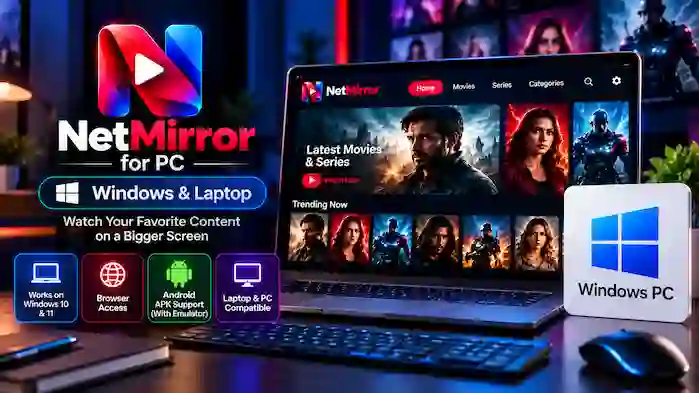
Looking for NetMirror for PC or NetMirror for laptop? This guide explains the different ways users may access NetMirror-related services on a computer, what an Android APK means for PC users, and which compatibility checks you should make before trying to use an Android application on Windows.
NetMirror APK files are designed for Android, so an APK should not be treated as a native Windows application. If you want to use NetMirror on a PC, you first need to determine whether a compatible web version, desktop application, or Android environment is available.
What Is NetMirror for PC?
NetMirror for PC refers to accessing NetMirror on a desktop or laptop computer.
PC users may search for terms such as:
- NetMirror for PC
- NetMirror for laptop
- NetMirror APK for PC
- NetMirror app for PC
- NetMirror PC download
- NetMirror for Windows
- NetMirror website
- NetMirror web
These searches can have different intentions. Some users want to access NetMirror through a browser, while others are looking for a way to run an Android APK on a computer.
Understanding the difference is important before downloading anything.
Can NetMirror APK Run Directly on a PC?
An APK is an Android application package. Windows does not normally install Android APK files in the same way that Android devices do.
Therefore, downloading an APK to your Windows PC does not automatically mean that the application will run.
If you have an Android APK and want to use it on a computer, you need a compatible Android environment or another supported access method.
NetMirror for Windows
Windows users commonly search for NetMirror for Windows because they want to access the service from a desktop or laptop.
Before looking for a Windows installer, determine whether an actual Windows application is available.
Do not confuse:
- .apk files with Windows applications
- Android applications with native PC software
- Web pages with desktop applications
A file advertised as a “PC APK” may still be an Android package rather than a native Windows program.
NetMirror for Laptop
A laptop can access websites through a standard web browser, but whether NetMirror works through the web depends on the availability and compatibility of the relevant web service.
If a supported web version exists, browser access can be simpler than attempting to run an Android APK.
For Android applications, a compatible Android environment may be required.
NetMirror Web
The term NetMirror web generally indicates users looking for browser-based access rather than an APK installation.
Web access has several differences from an Android application:
No APK Installation
A browser-based service does not require you to install an Android APK.
Desktop Browser Access
If the website is compatible with your browser, you can access it from a Windows PC or laptop.
Platform Flexibility
A web-based service can potentially work across different operating systems as long as the browser and service are supported.
If you specifically need the Android application, however, web access is not necessarily an equivalent replacement.
How to Use NetMirror on PC
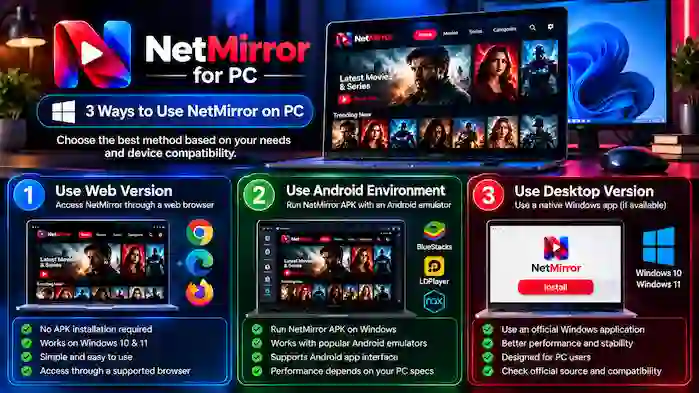
The correct method depends on what type of access is available.
Method 1: Use a Compatible Web Version
If NetMirror provides a compatible web interface, this is usually the simplest approach for PC users.
Open a supported browser, navigate to the relevant website, and use the available features through the browser.
No Android APK installation is required.
Method 2: Use a Compatible Android Environment
If the application is available only as an Android APK and you need the Android version on a computer, a compatible Android environment may be required.
Such environments can allow certain Android applications to operate on a PC, but compatibility varies.
Performance can also differ from using the application directly on an Android phone or tablet.
Method 3: Use a Supported Desktop Version
If a legitimate Windows or macOS version becomes available, use the version specifically designed for your operating system rather than trying to convert an APK into a desktop application.
NetMirror APK for PC
The search term NetMirror APK for PC can be misleading.
An APK is still an Android package even when it is downloaded onto a computer.
Before opening an APK on a PC, determine whether you actually need the Android version.
If your goal is simply to access a website, browser access may be more appropriate.
If your goal is to use the Android application, you need an environment that supports Android applications.
NetMirror App for PC
Users searching for NetMirror app for PC should first determine whether a native desktop application exists.
A native Windows application normally has a different installation format from an Android APK.
Do not install an unknown executable simply because its download page claims to be a “NetMirror PC version.”
Check the software source, file type, publisher information, and compatibility before running any installer.
NetMirror on Windows 10 and Windows 11
Windows 10 and Windows 11 users may have different options depending on the available access method.
For browser access, compatibility primarily depends on the browser and the website.
For Android applications, compatibility depends on the Android environment being used and whether it supports the application.
Before attempting installation, check:
- Windows version
- Available storage
- System resources
- Browser compatibility
- Android environment requirements
- Application requirements
NetMirror PC System Requirements
There is no single system requirement that applies to every possible way of using NetMirror on a PC.
Requirements depend on whether you are using:
- A web browser
- An Android environment
- A native desktop application
- Another supported access method
For browser-based access, a modern browser and stable internet connection are generally important.
For Android environments, additional system resources may be required.
NetMirror for PC Using a Browser
If a supported web version is available, browser access can be the most straightforward option.
Open Your Browser
Use a current browser such as Chrome, Edge, Firefox, or another supported browser.
Access the Web Version
Navigate to the relevant NetMirror web address.
Sign In if Required
If the service provides a legitimate login system, enter your account details through the appropriate page.
Avoid entering account credentials into unfamiliar pages or unofficial login forms.
Start Using the Service
Once the page loads successfully, use the available navigation, search, and playback controls.
NetMirror Login on PC
Some users search for NetMirror login or NetMirror login online APK when attempting to access the service from a computer.
If a legitimate NetMirror web service requires an account, use its official login page.
Be careful with websites that request unnecessary personal information or ask you to download unknown software before allowing access.
Never enter passwords into a page simply because it uses the NetMirror name.
NetMirror WebView and PC
The term NetMirror WebView is associated with searches about application-based web content.
WebView technology can allow an Android application to display web content inside the application environment.
However, an Android WebView component is not the same thing as a Windows browser.
If you are using a PC, you should determine whether you need the actual website or an Android application environment rather than assuming that a WebView APK will work directly on Windows.
NetMirror PC Installation Problems
PC users can encounter several problems when trying to access an Android-based application.
APK Will Not Open on Windows
This is expected if Windows does not have a compatible Android environment for the APK.
An APK is not the same as a standard Windows executable.
Application Does Not Start
If you are using an Android environment and the application does not launch, check the environment’s compatibility and available system resources.
Poor Performance
Performance can depend on your computer hardware, Android environment, application version, and network connection.
Website Will Not Load
If you are using a browser, check your internet connection, browser version, and whether the website is currently accessible.
Video Playback Problems
Playback can be affected by network speed, browser compatibility, device resources, and the service itself.
NetMirror PC Streaming Performance
Streaming quality on a PC depends on several factors.
Internet Connection
A stable connection helps reduce interruptions during online playback.
Browser
Keep your browser updated and use a browser supported by the website.
Computer Resources
CPU, RAM, graphics hardware, and background applications can influence performance.
Display
Your monitor’s resolution can affect how video content is displayed, although higher display resolution does not automatically improve the source video’s quality.
NetMirror for PC Safety Tips
When searching for a PC version, be particularly careful with unknown executable files.
Check the File Type
A Windows executable is different from an Android APK.
Verify the Source
Download software only from sources you trust.
Avoid Suspicious “PC Versions”
Be cautious about files advertised as unofficial cracked, modified, or unlocked PC versions.
Check Browser Permissions
If using a website, review any permission requests and do not grant unnecessary access.
Protect Your Account
Never enter passwords or personal information into suspicious login pages.
NetMirror PC vs Android
The experience can differ considerably between a computer and Android device.
| Feature | Android | PC |
| APK support | Native Android format | Requires compatible environment |
| Main input | Touchscreen | Mouse and keyboard |
| Display | Phone/tablet | Monitor |
| Installation | Android package installer | Browser or PC-compatible software |
| Updates | Android-compatible releases | Depends on access method |
| Navigation | Touch controls | Mouse, keyboard, or browser |
This is why users should choose the access method based on their device rather than assuming the same APK works everywhere.
NetMirror for Mac
Mac users should also distinguish between Android APK files and macOS applications.
An APK is not a native macOS application format.
If you are using a MacBook or iMac, check whether a compatible web version or supported desktop method is available instead of downloading an APK and expecting macOS to open it directly.
NetMirror for PC Alternatives
If NetMirror is not available through a compatible PC method, users can consider legitimate streaming services that offer native web or desktop access.
Depending on your region and content preferences, options may include services such as Netflix, Disney+, Amazon Prime Video, Tubi, and Pluto TV.
The availability and catalog of these services can vary by country.
Frequently Asked Questions
Can I install NetMirror APK directly on Windows?
An Android APK is not a standard Windows application. You need a compatible Android environment or another supported access method.
What is the easiest way to use NetMirror on PC?
If a compatible web version is available, using it through a supported browser can be simpler than attempting to run an Android APK.
Can I use NetMirror on a laptop?
Potentially, depending on whether a compatible web version, desktop application, or Android environment is available.
Is there a NetMirror PC version?
Do not assume that every website advertising a “PC version” provides a genuine native Windows application. Check the actual file type and source.
Can I download NetMirror APK on my PC?
You can download an APK file to a PC, but downloading it does not mean that Windows can run it directly.
Why won’t my NetMirror APK open on Windows?
The most likely issue is that an APK is an Android package rather than a native Windows application. A compatible Android environment may be required.
Can I use NetMirror through a browser?
If a compatible web version is available, you may be able to access it through a supported browser without installing an APK.
Does NetMirror work on Mac?
An Android APK is not a native macOS application. Mac users should check for a compatible web or desktop access method.
Final Thoughts
NetMirror for PC can mean several different things, including browser-based access, a native desktop application, or running an Android APK through a compatible Android environment.
The important distinction is that an APK is designed for Android and should not be treated as a normal Windows or macOS installer.
Before downloading any file, identify your intended access method, verify the source, and check compatibility. If a supported web version is available, browser access may be the simplest option. For Android APK usage on a computer, make sure the environment you choose actually supports the application.
By understanding the difference between NetMirror APK for PC, NetMirror web, and a native desktop application, you can avoid common compatibility problems and choose the most appropriate method for your computer.